For streamers · free
MapleStory Classic stream overlay for OBS
Show your EXP per hour, time to the next level, session EXP and mesos, and the next field boss on stream, in a window that looks like it belongs in MapleStory. It comes with the free MapleQuest Tracker desktop app and takes about a minute to set up.
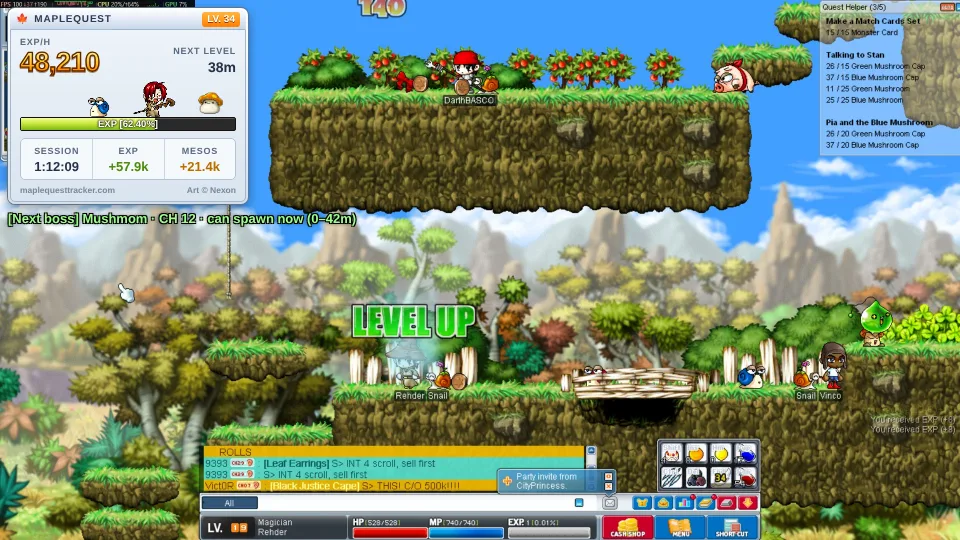
Set it up about a minute
- Get the desktop app if you don't have it: download MapleQuest Tracker (Windows or Mac, free). The overlay comes with version 3.25.
- Turn it on. In the app: Settings › Online › Stream overlay, then press Copy OBS link. The link is http://127.0.0.1:8793/obs
- Add it to your streaming app as a browser source (see below), paste the link, and set the size to 360 × 300.
- Place it where you like, usually a top corner. The background is see-through, so only the window shows on stream.
Add it to your streaming app
- In Sources, press + and pick Browser. Name it "MapleQuest".
- Paste the link in URL. Set Width 360 and Height 300.
- Leave Custom CSS as it is, and press OK. Drag the source where you want it.
- In Sources, press +, pick Browser Source and press Add Source.
- Paste the link in URL. Set width 360 and height 300, then Done.
- Edit your scene, press Add Layer and pick Embed Website.
- Paste the link and size the layer to about 360 × 300.
Pick what it shows
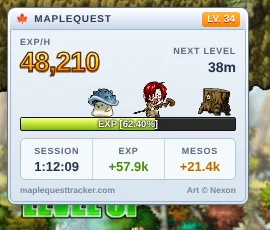
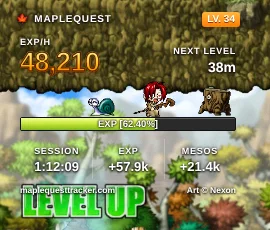
&style=clear. Only outlined text and the bar.Add these to the end of the link. Start with ? and join more with &, like http://127.0.0.1:8793/obs?w=exp&scale=1.5. Want the window and the boss line in different places? Add the source twice, once with ?w=exp and once with ?w=boss.
| Add | What it does |
|---|---|
w=exp | Only the window: EXP/h, time to the next level, the EXP bar, session, EXP and mesos so far. |
w=boss | Only the next field boss, as a notice line:  |
w=pop | Only the personal-best pop-up (turn it on first: Settings › Online › Personal-best pop-up). |
style=clear | No window, just outlined text, for a cleaner look. |
scale=1.5 | Bigger (or smaller, like 0.8). Make the source bigger to match. |
brand=0 | Hides the small maplequesttracker.com line. Keeping it helps the project grow. |
Personal-best pop-up optional

When you beat your best EXP/h on a map (after 5 minutes there), a green "New personal best" pops up on stream. It's off until you turn it on in Settings › Online.
Good to know
Capture the game window, not the whole screen
Use Game Capture or Window Capture for MapleStory. With a full display capture, the MapleQuest app window itself would show on stream too.
It shows nothing, or "can't reach"
The desktop app has to be running, with the stream overlay turned on. If another program already uses the address, the app picks the next one: copy the link again with Copy OBS link.
Does it cost CPU or send anything?
Hardly any CPU, and only while it's on. The page and its numbers stay on your own PC (the link only works on that PC), and nothing goes on the internet.
Does it touch the game?
No. MapleQuest Tracker only reads the picture on your screen, like your streaming app does. It never reads game memory or presses keys.
MapleStory art © Nexon, shown via maplestory.io. A free, unofficial fan tool, not affiliated with Nexon.