


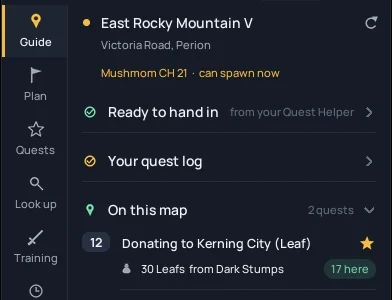
Guide
Quests you can do here, where to train, and the way there. It follows you from map to map.
Know what to do next, without leaving the game.
MapleQuest Tracker sits next to MapleStory Classic World and reads your map, level and EXP from the screen. It tells you which quests to take, where to train, what to farm, when a field boss can spawn and when a piece of gear is worth buying. Available right in your web browser or as a desktop overlay.
Download for Mac Beta
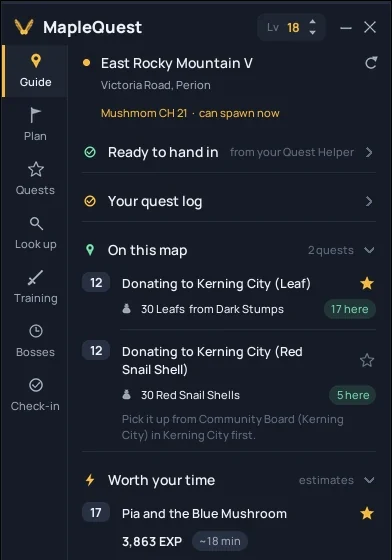
What it does
Quests you can do here, where to train, and the way there. It follows you from map to map.
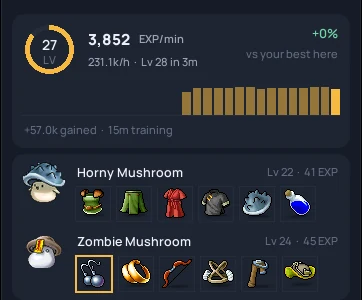
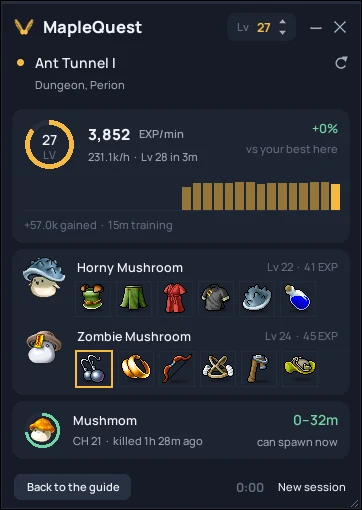
Shrinks to a few cards: EXP per minute, the monsters here with their drops, and the next boss.
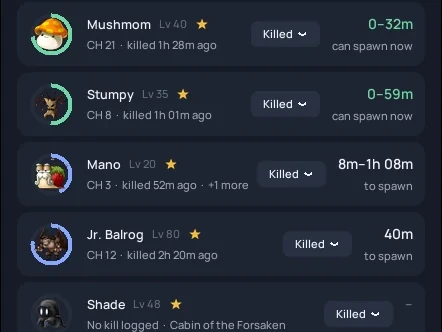
A timer for every boss and channel, and a sound the moment one can spawn.
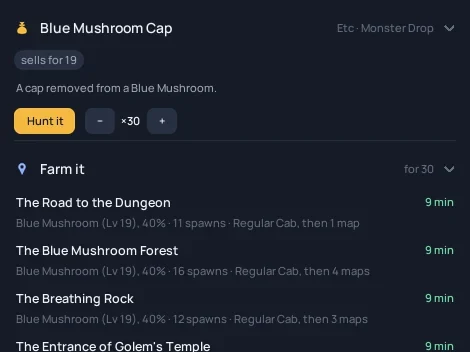
Any item, monster, map or NPC: where to buy it and the quickest places to farm it. Press Hunt it to keep the best spot in view.
Is it safe?
A fair question for anything you download, especially a game tool. Here's what MapleQuest Tracker does, what it never does, and how you can check it yourself instead of taking our word for it.
It never opens or reads the game's process. Everything comes from the picture on your screen, like a recording app.
It never presses keys, clicks or plays for you. You play; it suggests.
Nothing is loaded into the game. Hotkeys are ordinary Windows hotkeys.
It never asks for your Nexon account or password. If anything claiming to be this app does, it's fake.
Progress lives in your own AppData folder. Screenshots are never uploaded. It checks for updates, and nothing else leaves your PC unless you turn on price sharing. No ads, no tracking in the app.
It installs just for you, without an administrator prompt, and has a normal uninstaller.
Every update and every game data package is signed with a release key that never touches the update server. Before installing anything, the app checks that signature and every single file against it.
The Windows installer's SHA-256 fingerprint. If your file's fingerprint matches, it's the exact file we published.
1fd2fe07ebd2d84eedb67ebf2e6219cdd2c8d8922ea6e39bd739e4f7f8e152daIn Windows, open PowerShell in your Downloads folder and run Get-FileHash .\MapleQuest-Tracker-Setup.exe, then compare.
Windows shows "Windows protected your PC" and macOS Gatekeeper warns about apps from publishers they don't know yet. MapleQuest Tracker is a small fan project and isn't code-signed with a paid certificate yet, so you'll likely see it. On Windows, check the fingerprint above before clicking More info → Run anyway. On Mac, right-click (or Control-click) the app in Applications and choose Open (or allow it under System Settings → Privacy & Security → Open Anyway).
MapleQuest Tracker is a free, unofficial fan tool, not made by or affiliated with Nexon. It only reads your screen, but we can't speak for Nexon's rules, so read them and use your own judgement.
One installer, no admin rights. After that it keeps itself up to date.
Download MapleQuest-Tracker-Setup.exe for Windows or MapleQuest-Tracker.dmg for Mac (Beta). Everything is included, and it updates itself to the newest version the first time it starts.
Because this is a small fan project without a paid certificate, Windows or macOS may show a warning. On Windows, check the fingerprint, then click More info → Run anyway. On Mac, drag the app to Applications, right-click it and choose Open, and grant Screen Recording permission when prompted so it can read the game window.
The welcome guide finds the game and walks you through the rest. Ctrl Alt H hides or shows the overlay.
Click through Available, In Progress and Completed so it knows where you are.
A MapleStory-style overlay for OBS, Streamlabs and Twitch Studio: EXP per hour, time to the next level, session EXP and mesos, and the next field boss. It comes with the desktop app and takes a minute to set up.
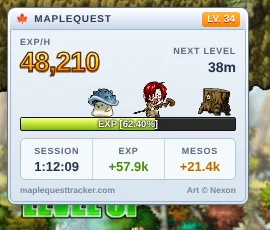
It only reads the picture on your screen, like a guide on a second monitor. It doesn't read game memory, inject anything or send input. It's still an unofficial tool and we can't speak for Nexon, so read the game's rules and use your own judgement.
No. It checks the update server for new versions, game data and Free Market prices. If you turn on Share Free Market prices (it's off until you do), it also sends the shops it reads: the item, the price, the amount and when, plus what the shop's sign shows (owner and title), the Free Market room and the channel, with a random id for your install so one person counts once. Never your own character or your screen. "Report a problem" only saves a zip on your own PC; you decide whether to send it to anyone.
Yes. Shops appear under "Where to buy" for 2 hours after someone sees them, and shop names are erased from the server after a day. If you'd rather not be listed at all, message us on Discord with your shop's name and it's never stored again.
Windowed and borderless windowed work best. It works with the game on a second monitor too. In exclusive fullscreen, Windows may hide the overlay.
Keep the minimap open; it reads the map name from there and checks again every few minutes. If something stays wrong, Settings shows what it read, and reading.log in the save folder says why.
Drop rates are reference rates, so luck varies. Damage uses the classic formulas with your stats and gear; trust the comparison ("2 attacks instead of 3") more than the exact number.
In %APPDATA%\MapleQuestHelper on Windows, or ~/Library/Application Support/MapleQuestHelper on Mac. Updates and reinstalls keep it; the uninstaller asks before removing it.
No. It's free, with no ads and no account.
The website uses privacy-friendly, cookieless analytics hosted in the EU (PostHog in memory-only mode with session recording disabled). No cookies or persistent identifiers are stored in your browser, no personal data is collected, and visits are not tracked across sessions or other sites. The desktop app does not run any analytics.