Free · in your browser · no account
MapleStory Classic EXP tracker
See your EXP per hour, time to the next level and your real mesos per hour while you train. It reads the EXP bar from your game window, right in Chrome or Edge. Nothing to install, nothing to pay, and a stream view for OBS built in.
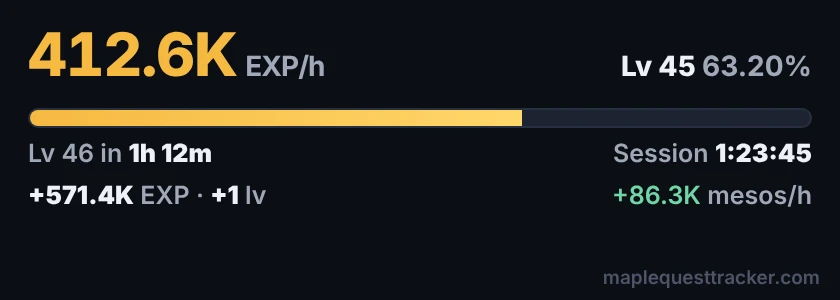
What it tracks
Start in a minute
- Open the tracker in Chrome or Edge on your PC: maplequesttracker.com/app, Training HUD tab.
- Press Link Screen and pick your MapleStory window. The page now reads your level and EXP bar from the picture.
- Train. EXP per hour and time to level show up after a few kills. Open your Item window (I) now and then, and your mesos per hour count by themselves.
- Want it next to the game? Press Float Mini HUD for a small window that stays on top.
On stream OBS, Streamlabs
- In the tracker, press Stream view. A small window opens, always 420 × 150, so it fits the same way in every layout.
- In OBS: Sources › + › Window Capture, and pick the window called MapleQuest EXP Tracker. In Streamlabs: Add Source › Window Capture.
- Drag it into place. Leave the window open (it can sit behind the game).
Want a MapleStory-style window with your character walking on the EXP bar, and the next field boss? That's the desktop app's stream overlay, also free.
Make it yours style, colours, size
Match the stream view to your stream in the Training tab's Stream view style card. You see every change live.
- Styles: Dark, Maple, Light, Neon and Green screen, or your own background, text and accent colours
- Your title on top, like "Road to 70" or your channel name
- Size, font and corners: small to extra large, five fonts, square to very round
- Pick the lines: EXP bar, time to level, session time, EXP gained, mesos per hour
- See-through on stream: pick Green screen, add a Chroma Key filter in OBS, and only the outlined numbers show
Free, and staying free
Every feature on this page is free, with no membership or supporter tier needed: EXP per hour, profit per hour, the pop-out and the stream view. MapleQuest Tracker is a fan project for the MapleStory Classic community.
Questions
Is the EXP tracker free?
Yes, all of it: EXP per hour, time to level, mesos per hour, the pop-out and the stream view. No membership, no account, no ads.
Do I need to download anything?
No. It runs in Chrome or Edge on your PC. You share your MapleStory window with the page once, and it reads the EXP bar from the picture. The desktop app does the same and more, if you'd rather have that.
How does it read my EXP?
From the picture of your game window, like your streaming app sees it. It never reads game memory and never presses keys, and the picture stays in your browser: nothing is uploaded (the live board only gets your EXP/h if you turn it on).
How do I show it on stream?
Press Stream view in the web app. A small window opens, always the same size (420 × 150). In OBS or Streamlabs, add a Window Capture of that window.
Can I change how it looks?
Yes. In the Training tab, open Stream view style: pick a style (Dark, Maple, Light, Neon, Green screen) or your own colours, add a title, and choose the size, font, corners and which lines show. It's saved in your browser.
Does it work in fullscreen?
Windowed and borderless work best: share the game window and it keeps reading while you play. In exclusive fullscreen some PCs send the browser a black picture; if that happens, switch the game to windowed. Your browser has to stay open in the background.
How are mesos per hour counted?
By themselves: open your Item window (I) for a moment now and then, and the tracker reads your mesos from it (a shop window works too). You can also type them in. Mesos coming in count as earnings; mesos going down, like potions bought, count as spent, so you see your real profit per hour.
A free, unofficial fan tool, not affiliated with Nexon. It only reads the picture of your game window: no game memory, no keys pressed.